
Software Vendors & OEMs
Ready to integrate web DICOM PACS Viewer and connectivity solutions

DENTISTRY
DICOM VIEWER
Dentistry DICOM Viewer ensures a way to search, view, analyze digital dental images, and make a diagnosis. Vendor-neutral DICOM Viewer proposes the possibility to view images, signals or videos for dentistry diagnostics. DICOM Viewer includes a wide range of features and measurements including specific tools for dental images.
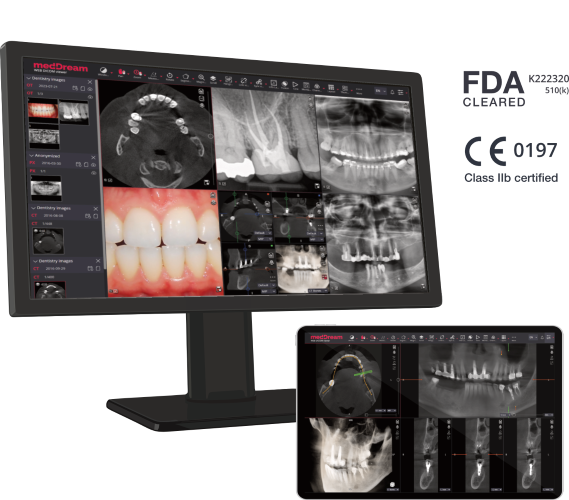


MedDream HTML5 DICOM Viewer provides a way to search, view, analyze digital dental images, and make diagnoses from anywhere and on any device. The vendor-neutral DICOM Viewer allows the viewing of digital images from oral surgery and dental devices. It includes a wide range of features, functions, and measurements, including specific features for analyzing digital dental images. Also, MedDream supports all modalities and video formats essential for dentistry.


The MedDream DICOM Viewer has a specific feature for analyzing digital dental images. Dental MPR feature is dedicated to perform panoramic image reconstruction and provide image analysis tools for dentistry:

Dental MPR
MedDream supports PDF, SR, PR, KO, Non-dicom, all modalities and video formats essential for dentistry:
Supported modalities for diagnostic use:
Video support:
Specific features:

This page covers Dentistry features of MedDream DICOM Viewer. Find more information about MedDream functionalities for dentistry, please download the Dentistry DICOM Viewer brochure. For other medical imaging fields, visit the main MedDream DICOM Viewer page or view the Specification file for full functionality.
What is the MedDream DICOM Viewer for Dentistry?
+MedDream is a vendor-neutral, HTML5 web-based DICOM viewer that provides specialized tools and MPR capabilities for searching, viewing, and analyzing digital dental and oral surgery images. MedDream supports the full range of dental DICOM imaging including 3D reconstruction:
What specific modalities does MedDream support for dentistry?
+MedDream supports essential dental modalities including Dental Computed Tomography (CT), Cone Beam Computed Tomography (CBCT), Dental Digital Radiography (DX), Panoramic X-Ray (PX), and intraoral/external photography (XC, SC).
Does MedDream support Cone Beam CT (CBCT) 3D imaging?
+Yes, MedDream supports spatial 3D imaging and includes robust tools to work with tooth and jaw images across three intersecting planes (Axial, Coronal, Sagittal) derived from CBCT datasets.
How are panoramic dental images generated?
+MedDream includes a specialized Dental MPR feature. It utilizes a Curved Planar Reconstruction (CPR) tool that allows dental professionals to draw an arch curve to automatically generate flattened panoramic images from 3D CBCT scans.
What measurements are available for dental analysis?
+The viewer provides a comprehensive set of measurements vital for dental planning, including Line, Angle, Area, Intensity (HU), Ellipse, and Continuous Measurement tools, alongside calibration features.
Can it play video from dental cameras?
+Yes, MedDream supports video playback for DICOM MPEG-2, MPEG-4, and H264 formats, accommodating video feeds from specialized intraoral cameras and oral surgery recordings.
Does MedDream support non-DICOM dental images?
+Yes, the viewer supports non-DICOM formats heavily used in dental practices, including BMP, JPG, PNG, TIFF, and PDF documents, allowing all patient media to be viewed in one cohesive interface.
How can dental clinics integrate MedDream?
+Dental software vendors and clinics can integrate MedDream into Dental Practice Management software or Dental PACS using flexible Integration APIs (URL, Communication, Viewport).
Is the dental viewer certified for diagnostic use?
+Yes, MedDream carries FDA 510(k) clearance and CE Class IIb medical device certification, making it legally compliant and safe for primary diagnostic reading and oral surgery planning.
Does MedDream support mobile viewing for dentists?
+Yes, utilizing a responsive HTML5 zero-footprint design, dentists can access CBCT volumes, panoramic x-rays, and measurement tools seamlessly on clinical desktop displays, tablets, or smartphones.

© 2026 MedDream UAB. All rights reserved.


 Software vendors
 Hardware vendors
 System Integrators
 AI & CAD vendors
 Education & Research
 AWS HealthImaging
 Azure Health Data Services
 Google Cloud Healthcare API
 Radiology
 Cardiology & Ultrasound
 Ophthalmology
 Orthopedics
 Dentistry
 Surgery
 Mammography
 Pathology
 Veterinary


